


Breastfeeding & Baby Tracker
4.94.23K Reviews
App Specs
- Version
- 10.5.2
- Updated On
- License
- Free
- Downloads
- 100,000+
- Developer
- ParentLove Baby Tracker by Coquisoft
- Categories
- Parenting
- Platform
- Android
Screenshots

 Analysis by AppCompare
Hey there, fellow parents! If you're like me, juggling the beautiful chaos of parenting while trying to keep track of every little detail, then you might find this app a game-changer. Today, I’m diving into the world of the Breastfeeding & Baby Tracker. Let’s see how it stacks up for us busy moms and dads.
Getting Started with Ease
First things first, downloading the Breastfeeding & Baby Tracker was a breeze. Available on both Android and iOS, it’s a quick find on your app store of choice. Once installed, the onboarding process is straightforward, guiding you through setting up profiles for your kids. Whether you’re a tech whiz or a bit of a newbie, you’ll find the interface intuitive.
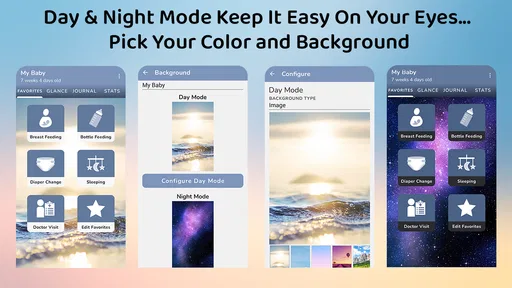
The app’s design is clean and friendly, with soft colors that feel easy on the eyes during those late-night feeding sessions. Trust me, anything that reduces screen glare at 3 AM is a win in my book!
Tracking Made Simple
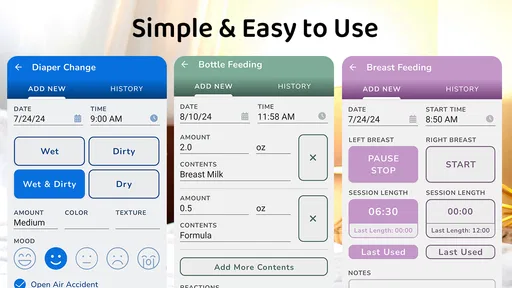
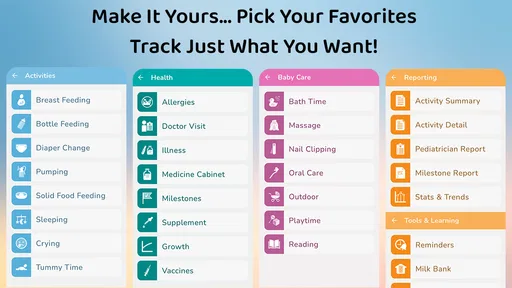
Now, let’s talk about its main gig: tracking. This app offers a comprehensive way to log breastfeeding sessions, bottle feedings, diaper changes, sleep patterns, and even your baby’s mood. It’s like having a digital diary tailored to your little one’s needs.
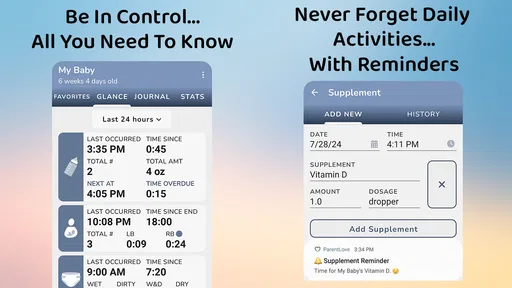
One of my favorite features is the ability to track each breast separately. For those breastfeeding, this is super handy for keeping a balanced feeding routine. Plus, you can set reminders for the next feeding session, ensuring you never miss a beat.
More Than Just Numbers
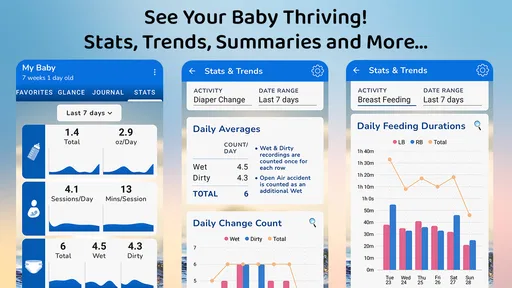
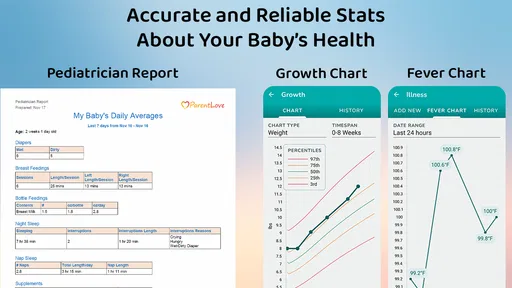
Beyond the basic tracking functions, the app provides insights that can be a real eye-opener. By analyzing the data, it helps you spot patterns in your baby’s habits. For example, you might discover that your baby tends to sleep longer after a certain feeding time or that they’re fussier on particular days. These insights can be golden for adjusting your routine to better suit your baby’s natural rhythms.
There’s also a nifty growth chart feature. It allows you to input your baby’s height and weight, plotting their growth against standard percentiles. For us parents, seeing those milestones visually can be incredibly reassuring.
Worth Reading Before You Choose

EA SPORTS FC Mobile 26 Is a Bigger Football Game, but It Takes Time

Flipboard Shows What News Apps Must Do Beyond the Feed

Switching to Android Auto Means Rethinking Your Driving Routine

Google Calendar Makes a Crowded Week Easier to Manage

Ludo King Makes the Most of the Minutes Between Plans

Baby Panda World Brings Quick Play to Modern Phones, but Its Game Library Feels Busy
Community and Sharing
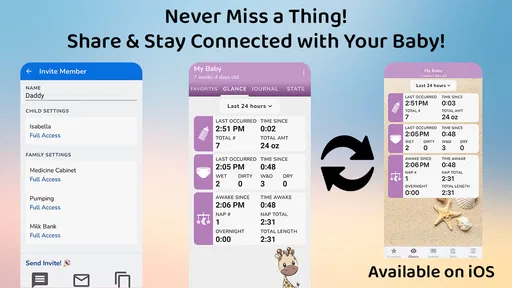
Another aspect I appreciate is the sharing feature. You can easily share your baby’s progress with family members or caregivers. This is particularly useful if you have a sitter or family member helping out, as it keeps everyone in the loop with the latest updates.
Moreover, there’s a community aspect within the app where you can connect with other parents. It’s like having a virtual support group at your fingertips, which can be a lifesaver when you need advice or just a bit of encouragement.
Final Thoughts
All in all, the Breastfeeding & Baby Tracker is a robust tool for parents looking to stay organized and informed. It integrates seamlessly into daily life, offering features that genuinely enhance the parenting experience. Whether you’re a new parent or just looking for a better way to keep track, this app is definitely worth a try.
So, if you're ready to embrace a little more order in the joyful chaos of parenting, give it a go! You might just find it becomes one of your most trusted parenting companions.
Pros
- Intuitive interface for easy tracking.
- Customizable reminders for feeds.
- Detailed growth charts included.
- Syncs across multiple devices.
- Supports multiple child profiles.
Cons
- Limited features in free version.
- Some users report sync issues.
- Ads can be intrusive at times.
- No offline mode available.
- Limited language support.
FAQs for Breastfeeding & Baby Tracker
What features does the Breastfeeding & Baby Tracker app offer?
The Breastfeeding & Baby Tracker app offers a comprehensive suite of features designed to assist new parents. These include tracking breastfeeding sessions, diaper changes, sleep patterns, and growth milestones. Additionally, the app provides reminders for feeding times and doctor appointments, ensuring parents stay organized and informed about their baby’s health and development.
Is the Breastfeeding & Baby Tracker app user-friendly for first-time parents?
Yes, the app is designed with first-time parents in mind, featuring an intuitive interface that makes tracking your baby’s activities simple and straightforward. It provides easy-to-navigate menus and clear instructions, ensuring even those with limited tech experience can use it effectively. The app also includes helpful tutorials and customer support if needed.
Does the app support syncing across multiple devices?
The Breastfeeding & Baby Tracker app supports syncing across multiple devices, allowing both parents to access and update their baby’s information from their smartphones or tablets. This feature ensures that all family members remain informed and can contribute to tracking the baby’s progress, making it a convenient choice for busy families.
Are there any privacy concerns with the Breastfeeding & Baby Tracker app?
The app takes privacy seriously, implementing strong data encryption to protect your personal information. Users can rest assured that their data is safe, as the app complies with privacy regulations and does not share information with third parties without consent. Additionally, users can customize privacy settings to enhance security further.
Is there a cost to download and use the Breastfeeding & Baby Tracker app?
The app offers a free version with basic features, suitable for most users. However, there is also a premium version available for a fee, which unlocks additional features like advanced analytics, personalized tips, and ad-free usage. This allows users to choose the option that best fits their needs and budget.


